
Technology
Passkeys Explained: The Technology Behind Passwordless Login

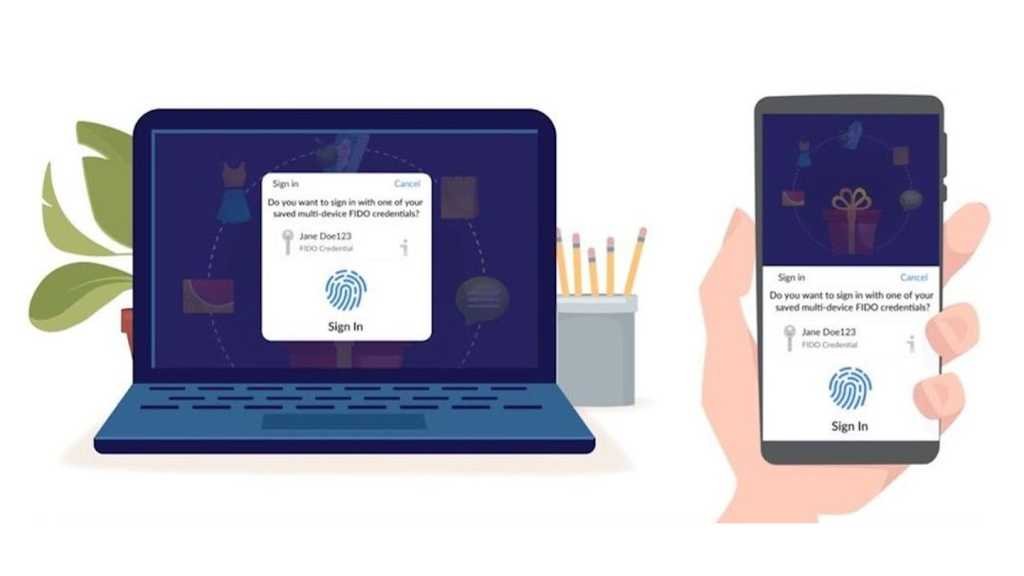
You are about to complete a transaction, and the login screen appears again. The password you are certain about fails once, then again. You switch to an OTP and watch the timer run while the session expires. At that moment, security does not feel like protection. It feels like a delay.
This is the point where the conversation around authentication changes. What is passkey, and why are product teams rebuilding their sign-in flows around it instead of trying to improve passwords? To see the difference in practical terms, explore what is passkey as a system that alters how your device, the browser, and the service recognise each other. The shift becomes visible when you notice what you are no longer asked to do. There is nothing to remember, nothing to type, and nothing that can be reused if intercepted.
Moving Away from Stored Secrets
To understand why this model matters, consider what happens after you create a password. A version of it is stored on a server. Even when protected with modern hashing techniques, it still represents a permanent verification target. The NIST Digital Identity Guidelines describe how password-based systems remain vulnerable because the authentication factor exists in a form that can be attacked repeatedly. Passkeys change this condition, and the service keeps only a public key. That key cannot be used to access an account.
The Large-scale Risk Angle
This single architectural change means:
- A database breach does not produce usable login material
- Credential stuffing loses its primary input
- Phishing cannot capture a working secret
When you ask what is passkey, this removal of stored authentication data is the real starting point.
The Moment You Sign In
The difference becomes clearer at the exact point where you tap “Continue”.
Instead of sending a password, the service sends a unique challenge. Your device signs it using a private key stored in secure hardware. The server verifies the signature using the corresponding public key. This flow is defined in the WebAuthn standard.
Why intercepted traffic has no value
When you research in detail, you will understand that each authentication event is:
- created for that session only
- valid for a short time
- impossible to replay
What travels across the network is proof, not a credential.
Your Device as the Verifier
The fingerprint or face scan you see on your mobile, laptop, or any other device does not travel to the service. It only unlocks the key stored on your device. Platform documentation across major operating systems refers to this as local user verification.
What this means for everyday use: You confirm your identity on the device you already trust. The service receives only a cryptographic response, and your biometric data remains where it was created. So when someone asks what is passkey, the simplest explanation is – your device performs the authentication for you.
Why Phishing Fails Without User Awareness
Think about how phishing works today. A page that looks identical to the original asks you to type something that still functions on the real site. Passkeys are bound to the domain where they were created. If the address changes, your device will not complete the sign-in.
The practical effect is simple: you do not have to recognise the attack. The authentication simply does not happen.
Signing In on a New Device
You will not always use the same screen. The passkey model allows you to approve a login on a new device using one that is already trusted.
Why portability does not weaken security
The private key stays on the original device. The new device receives only the result of the verification. At this point, what is passkey stops sounding like a login method and starts looking like a distributed trust system.
Rethinking Account Recovery
Recovery has traditionally relied on email links or SMS codes. Those channels are easier to intercept than the primary authentication factor. Modern passkey ecosystems use end-to-end encrypted synchronisation to restore access across devices. Platform documentation explains that these credentials are end-to-end encrypted during synchronisation.
How the experience changes for you: You regain access without creating a new password or answering security questions. Recovery becomes faster and more resistant to social engineering.
The Effect on Real Sign-In Journeys
Authentication is not only a security control. It is also the first step in a transaction or a session. Microsoft reports significantly higher sign-in success rates for passwordless flows compared to traditional credentials.
What platforms observe
- Fewer abandoned sessions.
- Reduced reset requests.
- Lower exposure to automated attacks.
For teams evaluating what is passkey, this is where security and conversion begin to align.
Built on Open Standards
Passkeys are not a proprietary mechanism. They are based on WebAuthn and the FIDO2 Client-to-Authenticator Protocol. These standards allow the same authentication model to work across browsers, operating systems, and devices. You must be questioning why this matters for the future. It is because the system scales without locking users into a single ecosystem.
Conclusion
Passwords required you to store and repeat a secret every time you wanted to access a service. Passkeys replace that repetition with a real-time cryptographic exchange performed by a device you already trust. Nothing reusable is stored. Nothing meaningful is transmitted or can be replayed later. So when the industry continues to ask what is passkey, it is not describing a faster way to log in. It is describing a model where identity is verified through possession and presence rather than memory.

How to Fix “Error Connecting to Server” on WebRTC Video Chats

Scaling Modern Applications: A Guide to Microservices and AWS Expertise

Evaluating a Fast Turn PCB Partner for High-Frequency Applications

Why Roaming Can Be a Problem Abroad and How an eSIM Can Help

Do You Really Need a Watch Winder for Your Automatic Watch?

Why Sportswear Is No Longer Limited to Athletes

The Name Necklace Trend Is Back, But More Grown-Up

A Clearer Route to Reliable professional drain clearance and CCTV inspection

Is The High Street Bank Losing Its Grip On UK Business Loans?

TabooTube Explained: The Powerful Platform for Unfiltered Content

SSIS 469: Fixing SQL Data Errors in ETL Workflows

content://cz.mobilesoft.appblock.fileprovider/cache/blank.html: Explained with Powerful Insights

Scrolller Explained: The Powerful Way to Browse Reddit Images

Zavalio com Explained: The Ultimate Truth You Must Know

adswynk com: Monetize Links With Smart Ads in 2025

Deshoptec com Review: Powerful Truth About This Online Store

kz43x9nnjm65: The Smart Code Transforming Digital Technology

Novafork: The Best Free Streaming Site for Movies, Shows & Anime

Milohacherry Coin Explained: The Powerful Lifestyle Crypto Rewarding Travel & Fitness
-
 Blog10 months ago
TabooTube Explained: The Powerful Platform for Unfiltered Content
-
 Blog12 months ago
SSIS 469: Fixing SQL Data Errors in ETL Workflows
-
 Blogs1 year ago
content://cz.mobilesoft.appblock.fileprovider/cache/blank.html: Explained with Powerful Insights
-
 Blog10 months ago
Scrolller Explained: The Powerful Way to Browse Reddit Images